

When the screen or digitizer for the Jeep Wrangler JK radio/head unit infotainment center needs to be replaced there's a video for that here.
However, the process is much different and easier for newer models like P68368204AB than what’s shown in that video, so I made a new guide so people don’t have to replace their entire headunit with a new one when the common problem of the digitizer eventually goes bad from hand oils or heat.
Tools Needed
* 7mm socket with wrench
* Small Phillips screwdriver
* Tiny Phillips screwdriver
* Small pry tool or small flathead screwdriver for prying
* Flashlight (optional)
* Screen or digitizer replacement
* Screen protector for digitizer (optional)
* Thin double-sided tape (optional)
* Lens cleaning cloth (optional)
Keep screws organized to separate different colored and different sized screws and dash bolts throughout the process.
---
Start With Dash Removal
Headunit Removal and disassembly
Power on the unit and press eject/load to flip open the screen. Unplug all head unit connectors in the rear with the screen left open for disassembly later.
Remove the head unit from the dash.
Remove the 2 screws from the top, then lift off the top cover.
Remove the 2 screws from the back, and the remaining 2 screws holding the DVD player in place, then flip over the DVD player and set it aside momentarily.
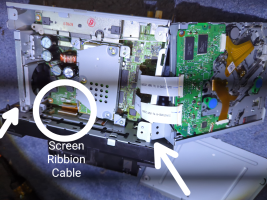
Remove the one wide ribbon cable at the front that connects to the screen. There is no need to remove the other ribbon cables. There is no small locking mechanism that secures the cable in place, just carefully push or pull straight.
Place the DVD player back in place.
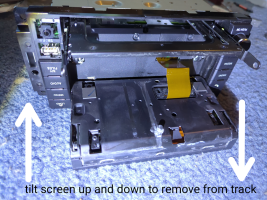
Lift and tilt the screen unevenly up and down until it can be removed from the tracks, then gently pull the ribbon cable out to release the screen from the unit.
---
Screen Disassembly
Remove the top 2 tiny screws, being careful not to strip them.
Carefully slip the tabs off around the edges and pry gently — do not bend them. The bottom does not need to be pried; it only needs to be pulled apart.
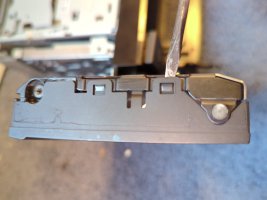
Pull the screen out from the trim cover.
Remove the 2 screws for the ribbon cable cover and pull out the ribbon cable connected to the digitizer, then lift the digitizer off. Mine did not have any glue and instead used thin double-sided tape on the screen, which was reused.
Make sure everything stays clean, and remove any fingerprints or debris from the screen and the new digitizer using a lens cloth.
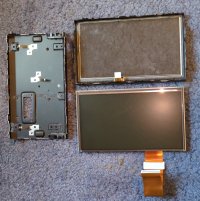
Remove the shipping film from the new digitizer and apply a compatible screen protector now, if desired, so the edges will be covered by the bezel.
Reassembly
Reassemble in reverse order, ensuring all ribbon cables are seated correctly and not pinched.
Test the touch responsiveness and display functionality before fully finalizing the installation.
Reinstall the head unit and the dash.
However, the process is much different and easier for newer models like P68368204AB than what’s shown in that video, so I made a new guide so people don’t have to replace their entire headunit with a new one when the common problem of the digitizer eventually goes bad from hand oils or heat.
Tools Needed
* 7mm socket with wrench
* Small Phillips screwdriver
* Tiny Phillips screwdriver
* Small pry tool or small flathead screwdriver for prying
* Flashlight (optional)
* Screen or digitizer replacement
* Screen protector for digitizer (optional)
* Thin double-sided tape (optional)
* Lens cleaning cloth (optional)
Keep screws organized to separate different colored and different sized screws and dash bolts throughout the process.
---
Start With Dash Removal
Headunit Removal and disassembly
Power on the unit and press eject/load to flip open the screen. Unplug all head unit connectors in the rear with the screen left open for disassembly later.
Remove the head unit from the dash.
Remove the 2 screws from the top, then lift off the top cover.
Remove the 2 screws from the back, and the remaining 2 screws holding the DVD player in place, then flip over the DVD player and set it aside momentarily.
Remove the one wide ribbon cable at the front that connects to the screen. There is no need to remove the other ribbon cables. There is no small locking mechanism that secures the cable in place, just carefully push or pull straight.
Place the DVD player back in place.
Lift and tilt the screen unevenly up and down until it can be removed from the tracks, then gently pull the ribbon cable out to release the screen from the unit.
---
Screen Disassembly
Remove the top 2 tiny screws, being careful not to strip them.
Carefully slip the tabs off around the edges and pry gently — do not bend them. The bottom does not need to be pried; it only needs to be pulled apart.
Pull the screen out from the trim cover.
Remove the 2 screws for the ribbon cable cover and pull out the ribbon cable connected to the digitizer, then lift the digitizer off. Mine did not have any glue and instead used thin double-sided tape on the screen, which was reused.
Make sure everything stays clean, and remove any fingerprints or debris from the screen and the new digitizer using a lens cloth.
Remove the shipping film from the new digitizer and apply a compatible screen protector now, if desired, so the edges will be covered by the bezel.
Reassembly
Reassemble in reverse order, ensuring all ribbon cables are seated correctly and not pinched.
Test the touch responsiveness and display functionality before fully finalizing the installation.
Reinstall the head unit and the dash.
Last edited: